Policy & Compliance
Role Required: STATE_ADMIN
Navigation: Top Navbar → State Dashboard → scroll to Policy Compliance Status section
Last Updated: March 2026 | Portal Version: 1.0
Overview
Policy compliance and KPA target tracking are displayed on the State Dashboard. These sections help you monitor whether societies follow required platform policies and track state-wide target achievements.
Policy Compliance Status
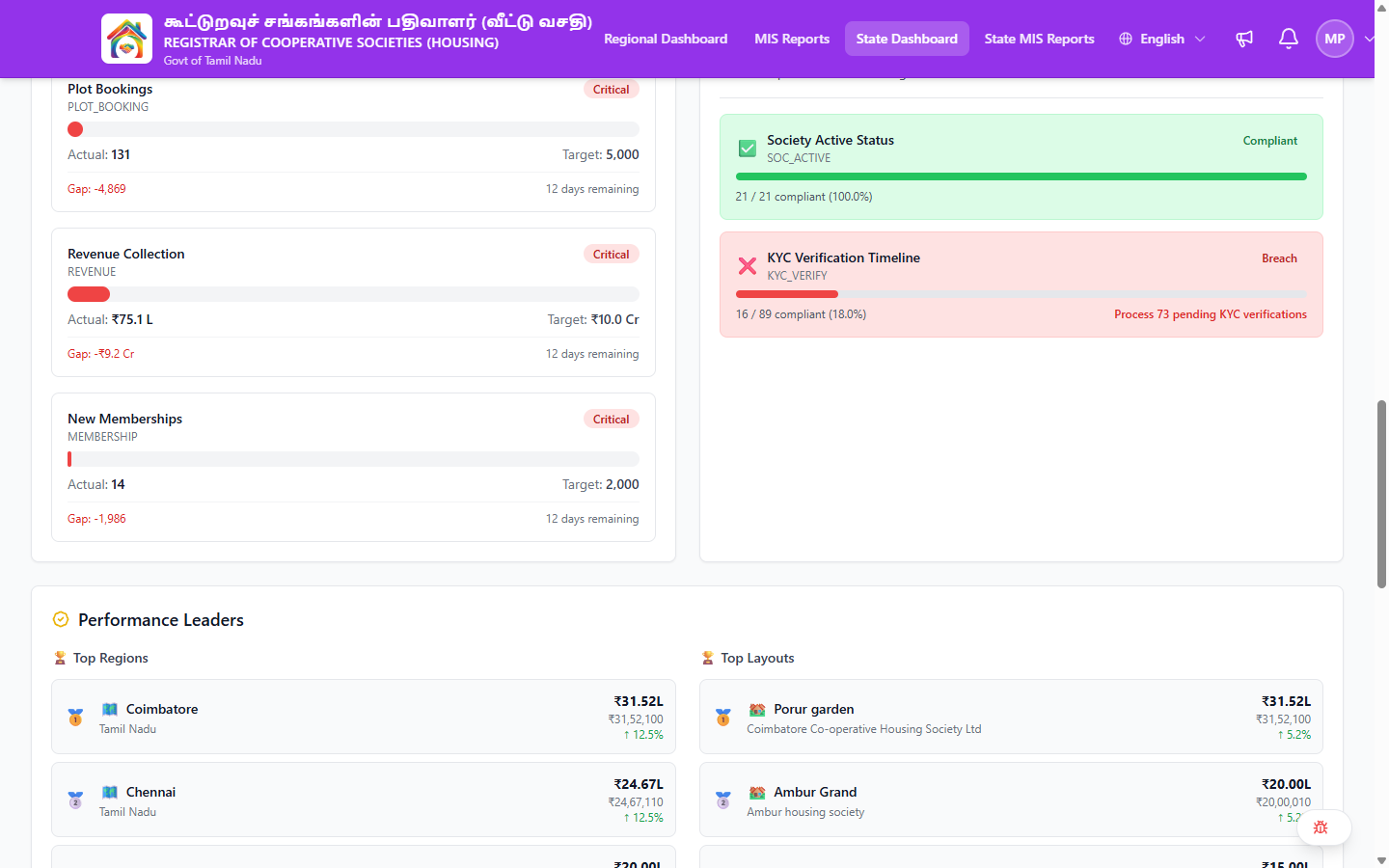
Located on the State Dashboard, the Policy Compliance Status section shows:
Summary Bar
Three counters at the top:
| Counter | Meaning |
|---|---|
| Compliant | Number of policies fully met across all societies |
| Warning | Policies at risk of breach |
| Breach | Policies not being met — requires attention |
Policy Areas
Each policy area is displayed as an expandable card:
| Element | Description |
|---|---|
| Policy Name | Human-readable name (e.g., "Society Active Status") |
| Policy Code | Internal code (e.g., SOC_ACTIVE) |
| Status Icon | ✅ Compliant or ❌ Breach |
| Status Label | "Compliant" or "Breach" |
| Compliance Rate | e.g., "21 / 21 compliant (100.0%)" |
| Action Required | If breach: specific action needed (e.g., "Process 73 pending KYC verifications") |
Click on a policy card to expand and see more details.
Current Policy Areas
Based on the live platform:
| Policy | Code | What It Checks |
|---|---|---|
| Society Active Status | SOC_ACTIVE | Whether all societies are in active status |
| KYC Verification Timeline | KYC_VERIFY | Whether membership KYC verifications are completed within the required timeline |
Policy areas may expand as the platform evolves. The State Dashboard automatically reflects any new policies added to the system.
KPA Target Trackers
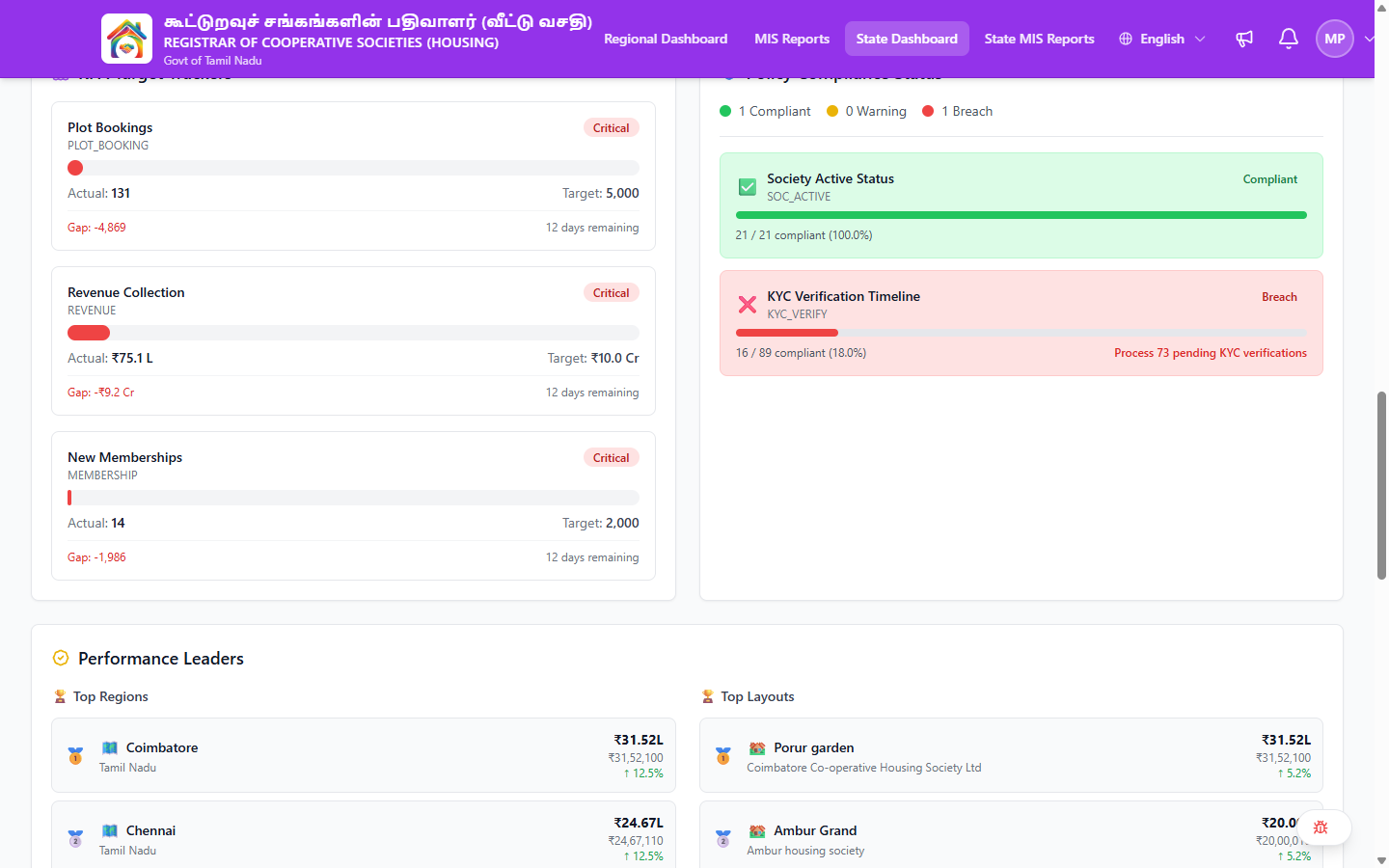
Also on the State Dashboard, the KPA Target Trackers section tracks state-wide performance against goals:
Tracker Elements
| Element | Description |
|---|---|
| KPA Name | The metric being tracked (e.g., "Plot Bookings") |
| Code | Internal code (e.g., PLOT_BOOKING, REVENUE, MEMBERSHIP) |
| Status Badge | Critical / At Risk / On Track |
| Actual | Current achievement value |
| Target | Goal for the period |
| Gap | Difference between actual and target (negative means behind) |
| Time Remaining | Days left in the current period |
Current KPA Targets
| KPA | Code | What It Tracks |
|---|---|---|
| Plot Bookings | PLOT_BOOKING | Total plot bookings state-wide |
| Revenue Collection | REVENUE | Total revenue collected |
| New Memberships | MEMBERSHIP | New member registrations |
Target Statuses
| Status | Meaning |
|---|---|
| On Track | Progress is at or above expected trajectory |
| At Risk | Slightly behind — may miss target without intervention |
| Critical | Significantly behind — needs immediate attention |
Reviewing Compliance
Daily Check
- Open the State Dashboard
- Scroll to Policy Compliance Status
- Check if any policies show ❌ Breach status
- If breach found, note the action required and follow up
Monthly Review
- Check compliance percentages across all policy areas
- Review KPA Target Trackers — any showing "Critical"?
- Identify trends: are gaps widening or closing?
Quarterly Review
- Full compliance dashboard review
- Target tracker progress check — are gaps manageable with time remaining?
- Identify systemic issues (same policies consistently in breach)
- Prepare compliance report for governance
Taking Action on Non-Compliance
| Situation | Action |
|---|---|
| Society Active Status breach | Verify which societies are inactive; contact Regional Admin |
| KYC Verification breach | Check pending KYC count; push Regional Admins to process verifications |
| KPA target Critical | Analyse which regions contribute to the gap; develop action plans with Regional Admins |
| Target gap widening | Review strategy; consider intermediate milestones |
Common Scenarios
"A policy area shows Breach — what do I do?"
- Note the policy name, compliance rate, and action required
- The action message tells you specifically what to address (e.g., "Process 73 pending KYC verifications")
- Use the Regional Dashboard to identify which regions/societies contribute
- Contact the relevant Regional Admins with specific to-do items
"A KPA target is showing Critical — what can I do?"
- Note the KPA name, actual vs. target, and the gap
- Check Time Remaining — how many days left?
- Use the State Dashboard Performance Leaders to see which regions are contributing (or not)
- Drill into underperforming regions via the Regional Dashboard
- Work with Regional Admins to develop action plans
"I need to report compliance status to the government"
- Open the State Dashboard → Policy Compliance Status section
- Note each policy area and its compliance rate
- Note each KPA Target Tracker and its actual vs. target
- Capture the data (screenshots or export from MIS Reports)
- Include trend data to show improvement trajectory
Related Pages
- State Dashboard — Compliance overview and target trackers
- Regional Oversight — Region-level drill-down
- State Financial Reports — Financial target context